


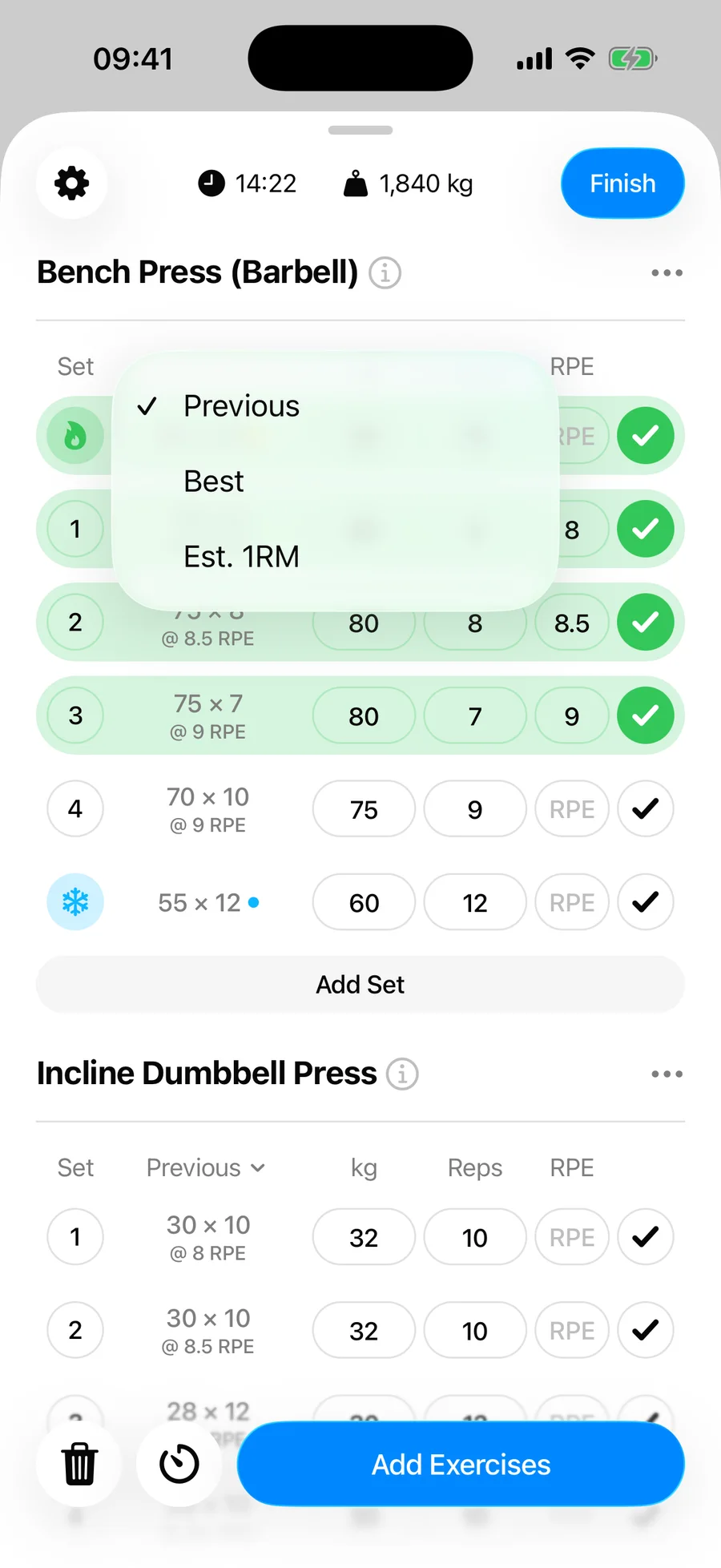
The reference column on every exercise — the one labeled Previous by default — is switchable. Tap its header to choose what you want to see next to each set while you lift.
The modes#
- Previous — what you did for the same set last time, including logged effort. The default, and the right mode for straightforward progressive overload. In a workout started from a routine, this means the last time you did that routine — so bench press in a heavy 5×5 routine and bench press in a high-rep routine each remember their own numbers.
- Previous (all) — your last performance of the exercise across all workouts, regardless of routine. Only offered in workouts started from a routine. In workouts without a routine you'll only see Previous — with no routine to scope to, it already shows your last performance from any workout.
- Best — your best performance for the set instead of the latest. Useful after a deload or a break, when "last time" understates what you can do.
- Est. 1RM — the estimated one-rep max each past set works out to. Available on weight-and-reps exercises; handy when you train the same lift at different rep counts week to week.
How to switch#
- In your workout, tap the Previous column header on any exercise.
- Pick a mode from the menu. In a routine workout, the two Previous options carry the captions This routine and All workouts, so it's clear which history each one reads from.
- To follow a specific session instead, open Past workouts and pick any of your last five performances of that exercise. Placeholders, set count, and progression follow that workout for the rest of the session. Choosing another mode, or tapping the same workout again, clears the pin.
The choice is remembered per exercise, so your squat can show Est. 1RM while everything else shows Previous. Apple Watch reads the same setting: sets on the watch pre-fill from this routine's history, or from all workouts if you have picked Previous (all) on the iPhone.
A few rules keep those suggestions sensible. Sets are matched to last time by type, so adding a warm-up today lines up with last time's warm-ups and your working sets keep their own numbers. Typing a weight into one set carries it forward to the later sets that shared that weight last time — a straight 3×5 moves together, but a heavy top set does not drag your lighter back-off sets with it. And warm-ups, drop sets, and working sets each keep their own suggestions, so editing one kind never rewrites another.
Bonus: a live focus metric#
The exercise menu (three-dot button) also has Set Focus Metric: a running total for the exercise — Volume, Total Reps, or Total Time — displayed under the exercise name with the change versus last time. Pick a metric, or choose Off to hide it. Good for days when the goal is "beat last week's volume," not a specific set.