


Every import — Hevy, Strong, JEFIT, Gript CSV, or AI — goes through the same review flow before anything is saved. Here is exactly what happens to your data along the way.
Gript also recognizes exports from FitNotes, StrengthLog, Fitbod, GymBook, SugarWOD, Fitness Point, Forge, StrongLifts, Lyfta, Motra, Ladder, Alpha Progression, SmartGym, Fitness Buddy, GymTracker, Strongineering, Bolt, FitSession, and HeavySet automatically — pick the file under Profile → Import Workouts and the same flow applies. StrongLifts exports keep every set. Pasted Japanese day-block training logs are read the same way: one workout per day, with every set, instead of a single collapsed session.
The three match levels#
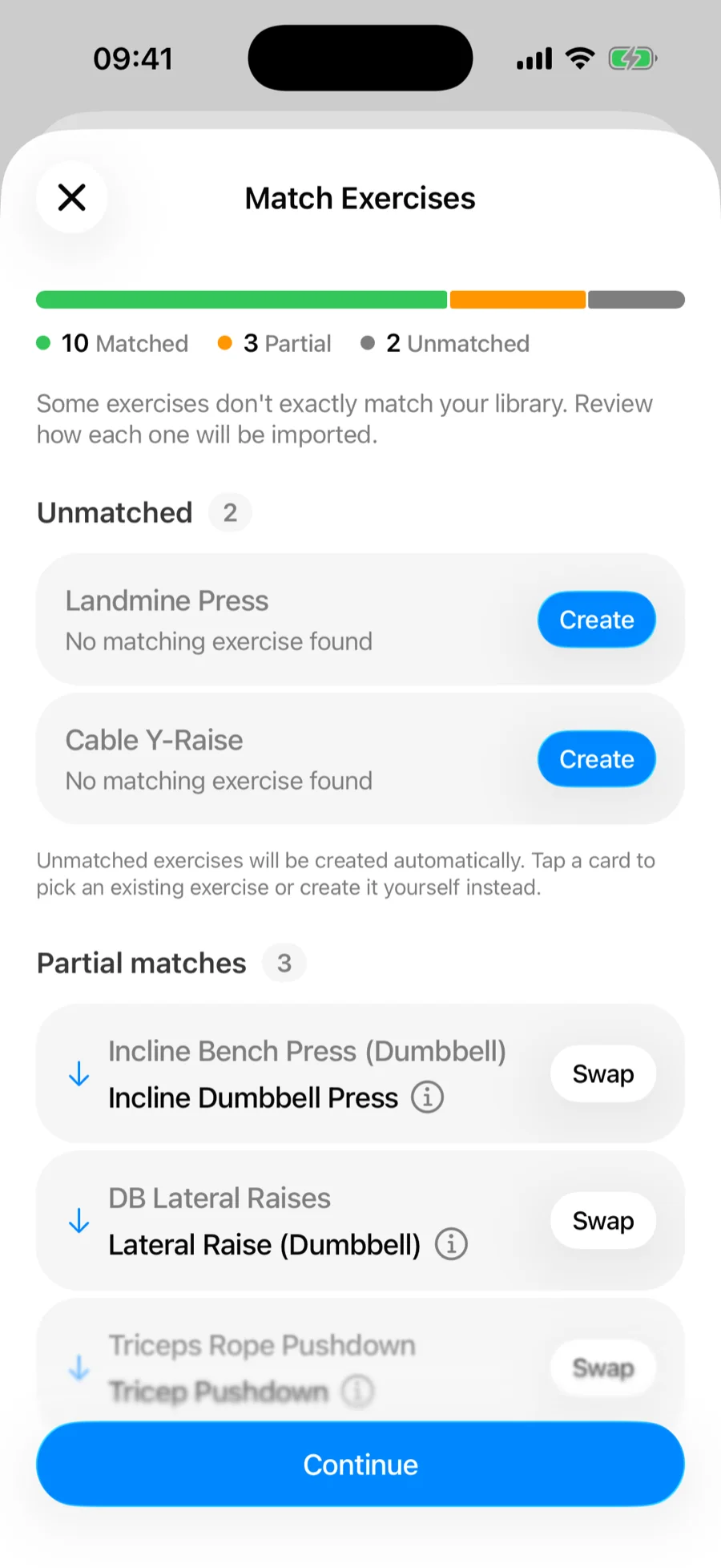
Each exercise name in your file is compared against the Gript library and lands in one of three buckets:
- Matched — the name is an exact match (ignoring case and formatting) for a library exercise. These import automatically and are only shown as a count.
- Partial match — no exact match, but one or more library exercises score close enough on a name similarity check. Gript pre-selects the best suggestion; you can accept it, pick a different suggestion, or choose any exercise from the library. The check is deliberately strict about qualifiers: a name that specifies a grip, angle, or variant ("Close Grip Bench Press", "Deficit Deadlift") is never auto-applied to a library exercise that lacks it, so you decide rather than silently losing the detail. Spelling variants like "Pull Up" and "Pullup" are treated as the same name.
- Unmatched — nothing in the library scores close enough. These are created as custom exercises with the name from your file, unless you tap the card and map them to an existing exercise instead.
Fixing a match#
Tap any card on the Match Exercises screen to change how it resolves:
- Use a suggestion — accept one of the proposed library exercises.
- Choose exercise — pick any exercise from the full library.
- Create new — create a custom exercise; Gript pre-fills the name and infers the exercise type (barbell, dumbbell, machine, and so on) from your data.
Imported plans#
A file or AI import that turns out to be a training plan rather than completed sessions becomes routines, and those skip the Match Exercises screen. Gript still matches every exercise name against the built-in library first — exact names, and names that reorder the equipment, like "Rope Triceps Pushdown" for the library's "Triceps Pushdown (Rope)". A custom exercise is created only when nothing in the library is a reasonable match.
How duplicates are detected#
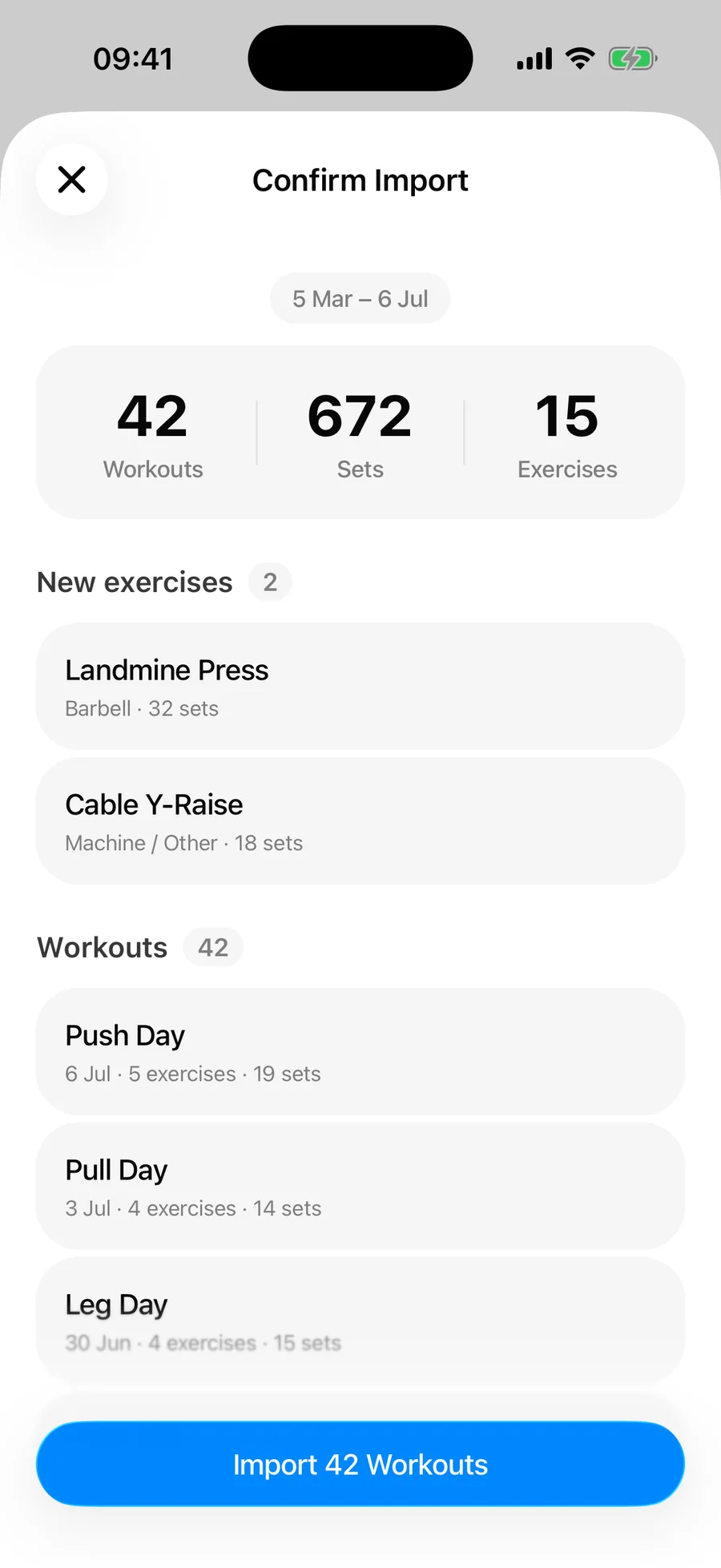
A workout from your file is skipped as a duplicate when a workout with the exact same completion time already exists in your history, or when an existing workout has the same name and finished within a minute of it. That means importing the same file twice — or re-importing after adding a few new workouts — never doubles your data. The confirmation screen tells you how many duplicates were skipped.
What is preserved#
- Per-set weights, reps, and durations
- Set types — warm-up, failure, drop set, cool down
- Workout names, dates, and durations
- RPE values, where your source app exported them
Rows the parser cannot read (a malformed line, an unsupported column) are counted and reported as skipped rows on the confirmation screen — the rest of the file imports normally. AI import is stricter: if the AI returns only a fraction of what the file clearly contains, Gript retries and, failing that, stops with an error rather than saving a partial history.
A few details are filled in for you. A file with no dates but a date in its name (workout_2026-09-14.csv) is dated from the file name. Cardio rows keep their distance instead of losing it into the reps column. Durations written out in words ("59 minutes 32 seconds") and per-set rep lists such as 8-8-7-6 are read as intended.