


The default rest duration applies everywhere, but each exercise can override it — longer rests for heavy compound lifts, shorter ones for isolation work, or none at all.
Set a custom rest time for an exercise#
- In your workout, tap the exercise's rest timer button.
- Choose Default (your global setting), Off, or a specific duration for this exercise.
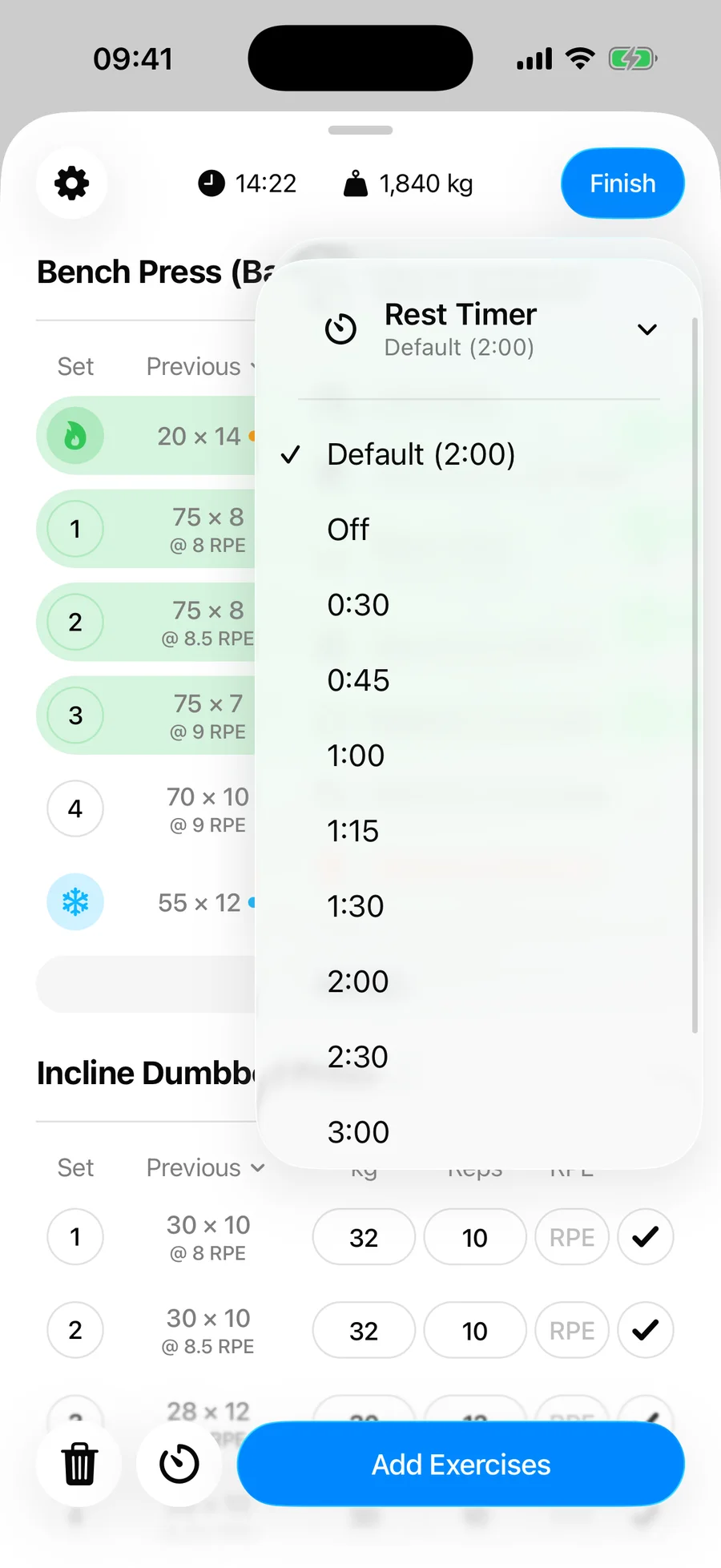
From then on, completing a set of that exercise starts the timer with its own duration. The override is remembered for the exercise, including in routines.
Let Gript learn it#
You do not have to set anything by hand. If you adjust an exercise's rest the same way twice in a row — two rests extended by 15 seconds or more, or two rests skipped early by that much — Gript takes the hint and makes the length you actually rested the exercise's new rest time, rounded to the nearest 15 seconds. A toast says Rest for Squat is now 3:00, with Undo if you disagree. Adjustments in different directions, or one-offs, change nothing.
Example setup#
- Squat — 3:00
- Bench Press — 2:30
- Lateral Raise — 1:00
- Plank — Off
One default, three overrides — and every rest in the session is the right length without touching a timer.