


Progression suggestions tell you what to lift next. After each workout, Gript looks at the sets you logged — the weight, the reps, and how hard they felt — and works out whether you should add weight, add a rep, hold steady, or briefly back off next time.
Turn on progression
- During a workout, tap the gear button to open Workout Settings.
- Tap Progression.
- Turn on Progression Suggestions.
What you see during a workout
When Gript has a suggestion for a set, the weight and reps placeholders show the suggested values in your accent color, with a small badge on the field that changes — an up arrow for more weight, +1 for an extra rep, a down arrow for a back-off. Tap the badge to see the full reasoning: your last performance, logged effort, estimated 1RM, and why Gript suggests the change. From there, apply the suggestion or keep your previous numbers in one tap.
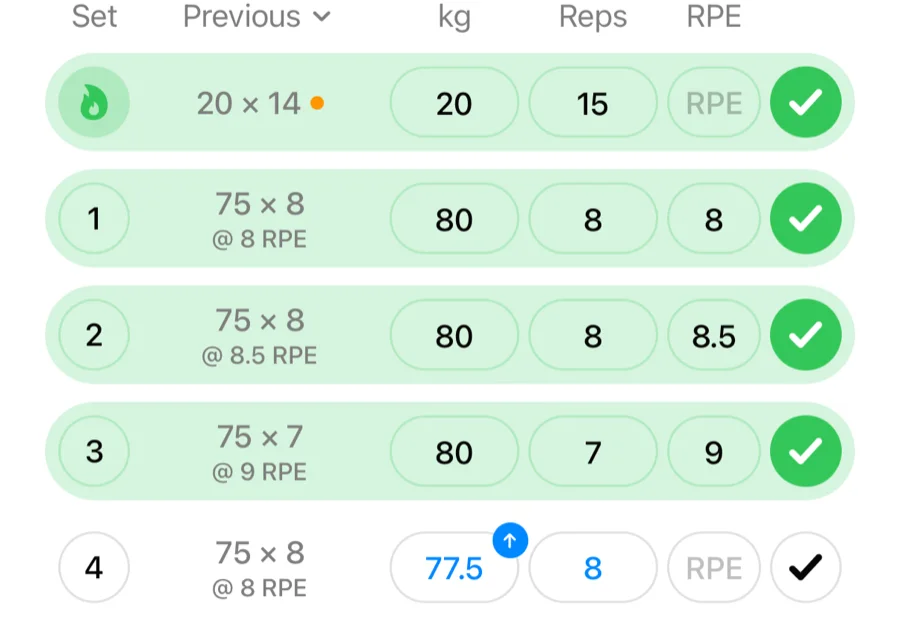
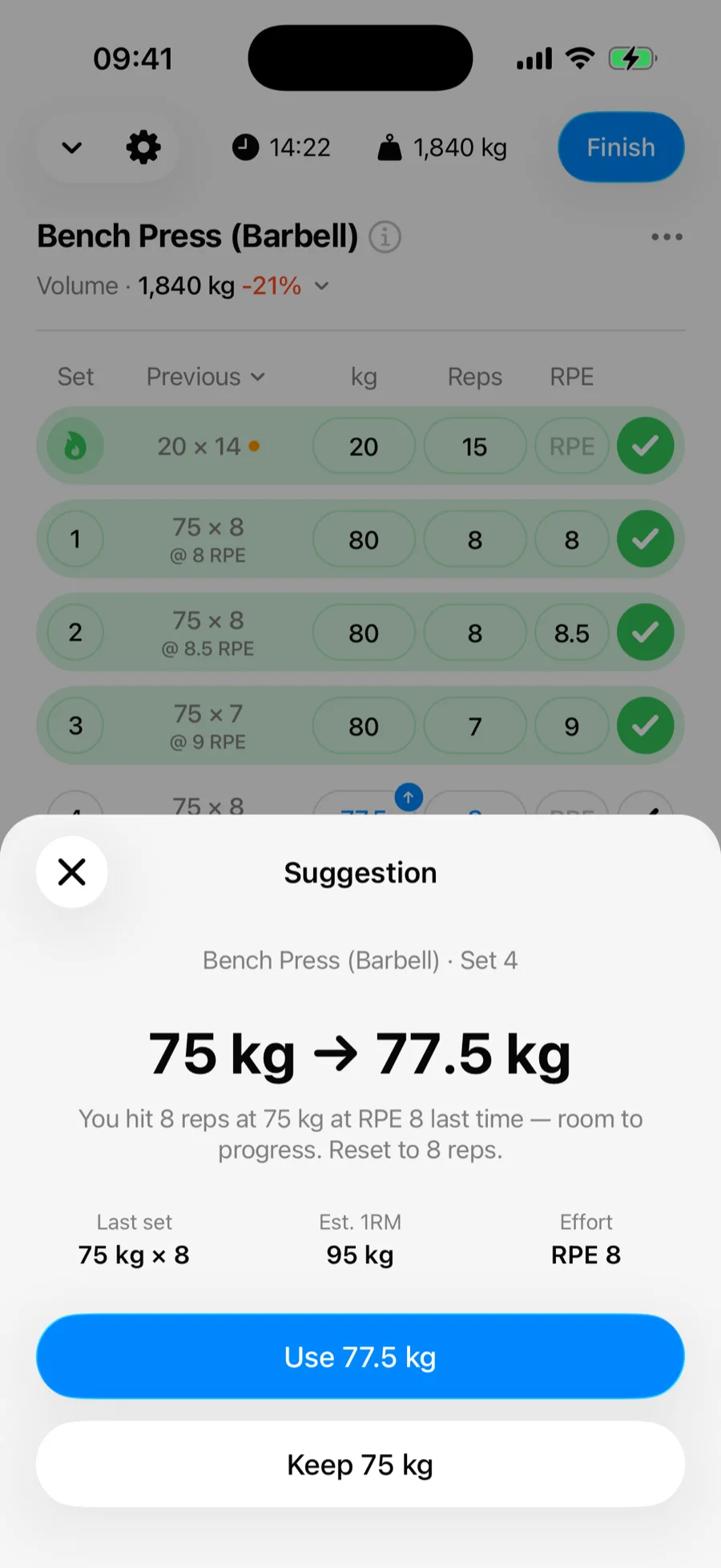
Suggestions are just placeholders — typing any value overrides them, and whatever you log is what counts. They are also what gets logged when you complete a set without typing, whether from the set row, the Live Activity, your Apple Watch, or Log All Sets at the end.
Not in the mood to push today? Tap Skip suggestion on the reasoning sheet and choose For this exercise or For this workout to hide the suggestions for the rest of the session — they return next time. Gript backs off on its own too: once an earlier working set of an exercise falls short of its suggested target, the remaining sets go back to showing last time's numbers instead of pushing further.
After the workout
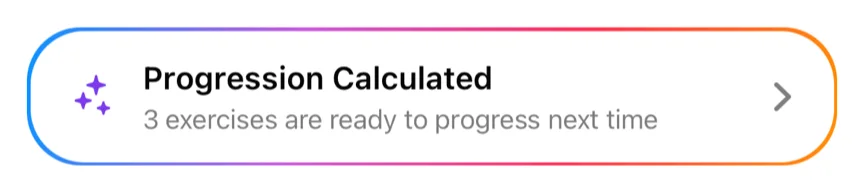
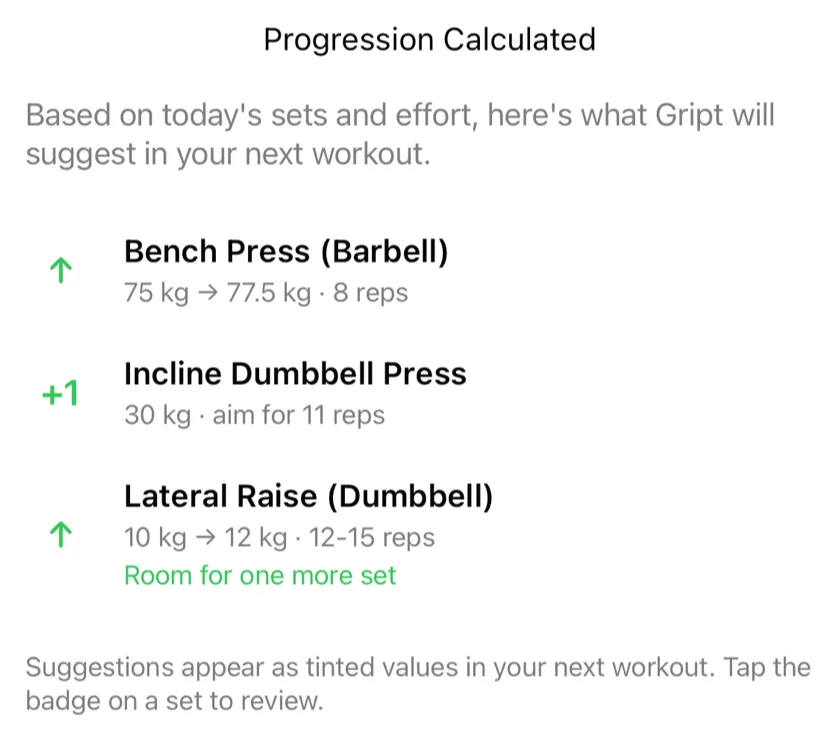
When exercises are ready to progress, the workout completion screen shows a Progression Calculated card. Tap it to see every suggested change for your next session while the workout is still fresh in your mind.
The card's colour tells you the direction before you open it: green with an up arrow when exercises are ready to move up or the session is a mix of changes, orange with a down arrow when every exercise should back off next time. Without Gript PRO the card shows in purple with a PRO badge — the calculation still runs, and tapping the card shows what unlocking includes.
How the suggestions work
Gript uses RPE-aware double progression:
- Hit the top of your rep range at a comfortable effort → add weight and reset to the bottom of the range.
- Inside the range → add one rep at the same weight.
- Very hard session (RPE 9.5–10) → hold your current numbers and consolidate.
- Missed the bottom of the range twice at the same weight → back off around 5% to rebuild momentum.
- Light lifts progress by reps first — when the smallest weight jump would be a big relative increase (think dumbbell curls), Gript banks a couple of extra reps past your range before suggesting more weight.
- Very easy sets jump further — top of the range at RPE 6 or below suggests a double increment.
- Volume, not just load — when every set of an exercise felt comfortable and the weight is moving up, the completion summary also notes there's room for one more set.
- Bodyweight and reps-only exercises add reps in proportion to volume — the more total reps you did last time, the more sets earn a +1, one rep per set at most, starting with the sets that had the most left in the tank (or the earliest sets when effort isn't logged). Once every set reaches the top of your range, Gript suggests another set instead.
- Weighted bodyweight moves earn their first plate — once every set of dips or pull-ups sits at the top of the range with bodyweight alone, Gript suggests the first increment. From there, jumps are judged against your body weight plus the added load, so +2.5 kg on a weighted pull-up counts as the small step it is.
- Failure sets count as evidence — mark your last set as Failure and it gets its own target ("beat 13"). Push it two reps past the top of your range and every set moves up in weight next time.
- Extra reps follow the session — on reps-only exercises, beat set one by a rep and the +1 planned for set two disappears; only match it and the extra rep moves on to the next set.
- Plateaus reset — three sessions at the same weight without a single extra rep triggers a short back-off so you can build back up, instead of holding forever.
- Deloads are recognised — a session that was clearly lighter yet felt easy is treated as a lighter week, and the next suggestion is your pre-deload numbers, not a step up from the light ones.
- Fatigue check — if most of your session is holding or backing off, the summary suggests taking a lighter week.
Rep targets come from your routine's rep ranges. Training without a routine? Gript uses your best recent reps as the goal, so freestyle workouts get suggestions too. Only your heaviest sets progress — lighter ramp-up sets carry over unchanged — and if you don't log effort, Gript waits until you've matched your benchmark two sessions in a row before suggesting more weight. Logging effort is optional but makes suggestions noticeably smarter — a single comfortable session is enough to progress when Gript knows how hard it felt.
Style and weight increments
In Workout Settings → Progression you can tune how the engine behaves:
- Style — Conservative waits for easy sets before progressing, Standard suits most lifters, and Aggressive keeps pushing until you are close to failure.
- Weight increments — the smallest step used per equipment type (barbell, dumbbell, machine), set separately for kg and lbs.