

Complete a set on the watch and the rest countdown takes over the screen — no tapping, no phone. It uses the same per-exercise rest durations as your iPhone.
What the countdown shows#
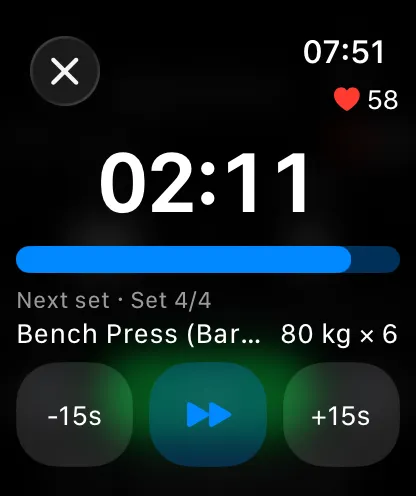
- Remaining time with a progress bar, plus your live heart rate.
- A preview of the next set — exercise, set number, and planned weight and reps — so you can load the bar while you rest.
- −15s / +15s buttons and a Skip button.
When the countdown hits zero, the watch taps your wrist. You can turn the haptic off in the watch app's settings without affecting the iPhone's rest timer sounds.
Synced with your iPhone#
The rest timer is one timer across devices. Complete a set from the iPhone — in the app or from the Live Activity — and the countdown appears on your wrist. Skip or adjust it on the watch and the phone and lock screen update too.