

Logging on the watch is built around the Digital Crown and a single big checkmark: values come pre-filled from your last workout, so most sets are one tap.
Adjust weight and reps#
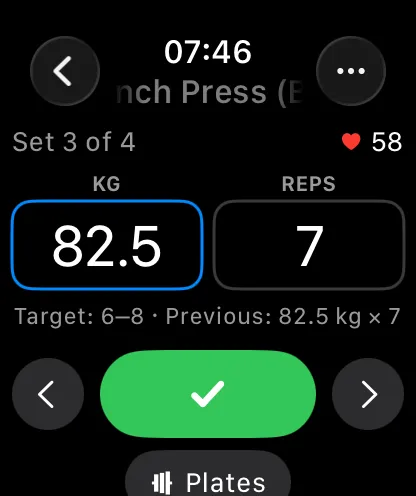
- Tap a set to open it. The weight and reps boxes are pre-filled from last time (or your routine).
- Turn the Digital Crown to adjust the highlighted box — weight moves in 0.5 steps, so fixed dumbbells like 3 kg are always reachable. Tap the other box to switch focus.
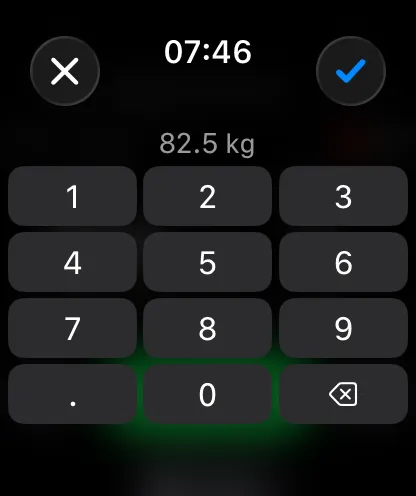
- Tap the highlighted box again to type the value on a number pad — fastest for big jumps.
- Tap the checkmark to complete the set. The rest timer starts and the next incomplete set opens automatically (you can turn auto-advance off in the watch settings).
Set types, effort, and extra sets#
The … button on a set opens its options: change the set type (warm-up, failure, drop set, cool-down), rate effort using RPE or RIR (matching your iPhone setting), and add or delete sets.
Exercises: add, replace, reorder, notes#
From set options, Exercise opens exercise-level actions: search the full exercise library to add or replace an exercise, move it up or down, edit its note (dictation works well for this), or delete it. The plate calculator and warm-up calculator are there too for barbell work.
Supersets#
Supersets keep their colored markers on the watch, and completing a set automatically advances to the paired exercise's next set — the same round-robin order as on the iPhone.
Timed sets#
Duration exercises get a stopwatch: tap play, do the work, and complete the set to log the measured time — or dial a duration with the crown instead. See timed sets and the stopwatch.
Everything stays in sync#
Every set you log on the watch appears on the iPhone (and its Live Activity) within a moment, and sets completed on the phone or lock screen show up on the watch — you can switch devices mid-workout freely.