
Alpha Progression vs Fitbod vs Gript: Which Workout Tracker Is Best?
Three apps that tell you what to lift next, compared on how they decide: Alpha Progression set targets, Fitbod recovery sessions, Gript reasoned suggestions.
Updated September 27, 2026 · Facts checked September 8, 2026


Comparing Alpha Progression vs Fitbod vs Gript
Alpha Progression, Fitbod, and Gript all answer the same question: what should I lift today. Alpha Progression keeps you on a stable plan and hands you a weight, rep, and RIR target for every set. Fitbod writes a fresh session each time from which muscles have recovered. Gript logs whatever routine you already follow and, with Pro, suggests the next weight or rep per set and shows the reason. Here is an honest look at all three, with facts taken from each app’s own help center and App Store listing.
What sets Alpha Progression vs Fitbod vs Gript apart
Alpha Progression is a German app built around a plan you keep for months. The generator builds the split and the algorithm sets weight, reps, and RIR for every set, with periodization and scheduled deloads. Recommendations, generator, and charts are all Pro, and there is no Apple Watch app.
Fitbod is the largest app here, with 284,000 US ratings at 4.8. Its core mechanic is muscle recovery: it scores every muscle group from 0 to 100 and writes the next workout around the freshest ones. You never own a program, which is both the appeal and the trade-off.
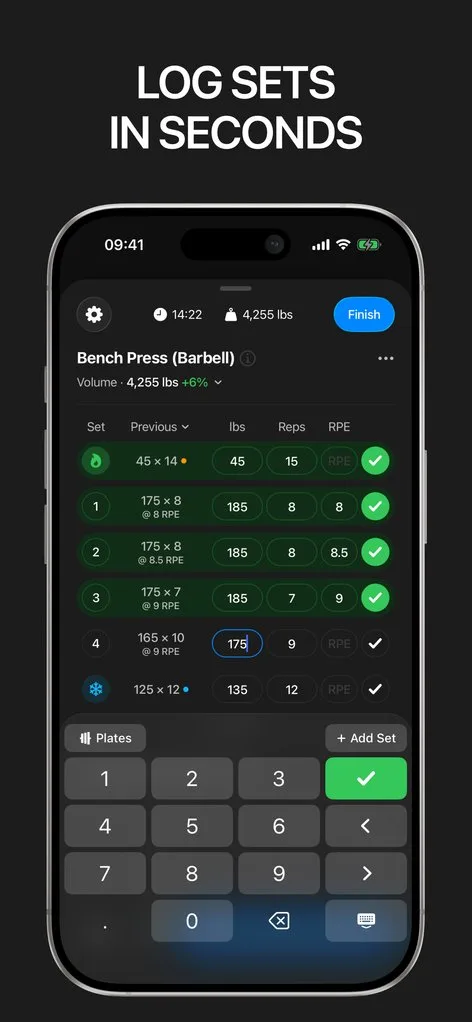
Gript is a logger first. You build or import a routine, log with previous sets in view, and Pro adds a suggestion per set with the reason shown. It is the most transparent engine here and the cheapest, but it has no periodization blocks, no recovery model, and no web app.
 How Alpha Progression stands out
If you want a stable program with a target for every set, Alpha Progression provides:
- A weight, rep, and RIR target. Calculated from previous workouts and the sets already done today, so set three is not set one. It knows your gym’s increments and trades load for reps when needed.
- Periodization and scheduled deloads. Plans ramp sets and RIR week by week with deload weeks built into the cycle. Neither Fitbod nor Gript schedules a deload.
- A plan generator with 795 exercises. Goal, training days, session length, priority muscles, and equipment produce an editable split, and multiple gym profiles each carry their own equipment.
- The most generous free tier. Unlimited logging, unlimited hand-built plans, all 795 videos, measurements, and CSV export, no account needed. Pro is $12.99 a month or $79.99 a year.
 How Fitbod stands out
If you want the app to write each session, Fitbod provides:
- Recovery picks the session. Each muscle group gets a recovery percentage from 0 to 100, returning to full after roughly six to seven days, and the next workout favors the freshest groups.
- Loads that vary on purpose. Sets, reps, and weight come from your history, a scheme Fitbod calls mStrength, and Max Effort Days that recalibrate its strength estimate. Set-level reasoning is not shown.
- The largest library and integrations. Over 1,000 exercises with multi-angle video, an Apple Watch app, Android, and Apple Health, Health Connect, Strava, and Fitbit activity feeding recovery.
- Subscription only. $15.99 a month or $95.99 a year after the trial; legacy $12.99 and $79.99 plans remain in the listing. No free tier, and following a fixed program is awkward.
 How Gript stands out
If you already have a routine and want help running it, Gript provides:
- A suggestion per set, with reasons. Tap the badge on a suggested set for last performance, effort, estimated 1RM, and the sentence explaining the change (Pro). See progression suggestions explained.
- RPE-aware double progression. Top of the rep range at a comfortable effort adds weight, inside the range adds a rep, and two misses back off around 5 percent. Deloads are suggested, not scheduled.
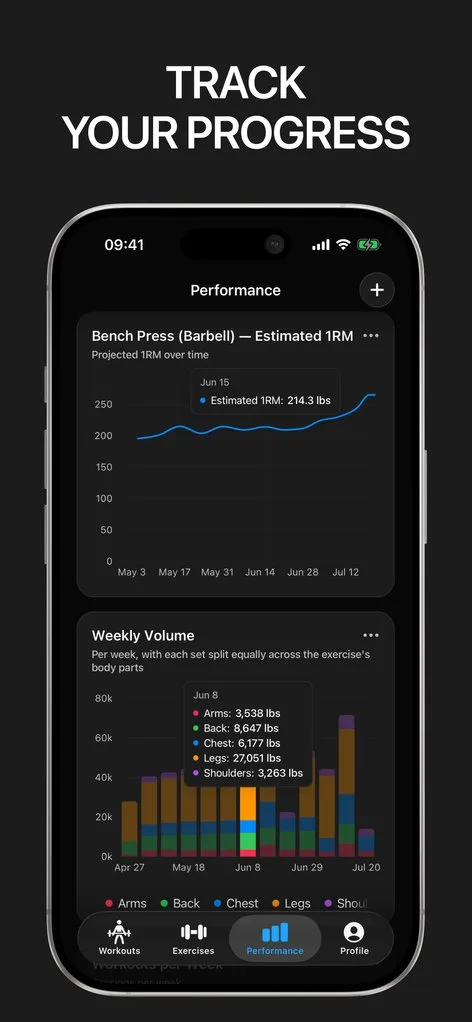
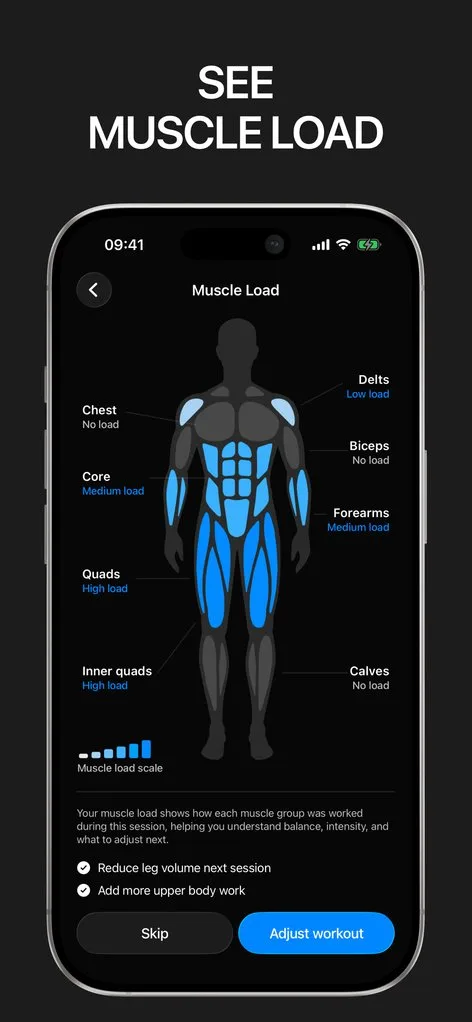
- Nineteen chart templates. Nine per exercise, including working weight range, plus a muscle balance radar and a body map. Twelve weeks are free; longer ranges are Pro. See chart types.
- Import from 22 apps. Fitbod CSV imports directly and AI import reads a program from text or a screenshot. Pro is $4.99 a month or $29.99 a year. No recovery model.
Common questions
Is Alpha Progression free?
Yes, permanently: unlimited logging, unlimited hand-built plans, all 795 exercise videos, body measurements, records, and CSV export, with no account needed. The generator, recommendations, charts, multiple gyms, periodization, and deloads require Pro at $12.99 a month or $79.99 a year, with a 14-day trial on the yearly plan.
Does Fitbod tell you what weight to lift?
Yes. Fitbod recommends sets, reps, and weight for every exercise in the generated workout, from your history, a varying intensity scheme, and periodic Max Effort Days that recalibrate its strength estimate. It does not explain a specific set’s numbers and varies them on purpose.
Can I move my Fitbod or Alpha Progression history into Gript?
Fitbod, yes: export from Fitbod and import the file in Gript, which matches exercises to its library so charts and progression continue; see import from Fitbod. Alpha Progression, yes as well: Gript reads its workout export directly and runs the same exercise matching step. Neither competitor imports history from other apps.
Final verdict: which one should you choose?
- Choose Alpha Progression ifAlpha Progression
you want one program that stays put for months, a weight, rep, and RIR target for every set, periodization and deloads inside the app, or Android.
- Choose Fitbod ifFitbod
you do not want to own a plan and would rather have a balanced session written from recovery, equipment, and time, with the largest exercise library and an Apple Watch app.
- Choose Gript ifGript
you already have a routine and want set-level suggestions with their reasoning, the deepest charts of the three, and the lowest price.
All three will progress you; the difference is who owns the plan. Alpha Progression holds the program and sets every target, Fitbod writes the session so you never need one, and Gript helps you run the one you already have. Fitbod users can bring their history with the import guide.
Download Gript free and bring your history with you. If it does not earn its place, your data exports in one tap.
I have tried pretty much every workout tracker out there — Hevy, Strong and many others — and Gript has quickly become my favorite. The UI and overall design are easily the best on the market.
You're already in Gript
Everything on this page is also available inside the app — this article opens from Help, and the calculators live under Tools.
Side by side
| Feature | Alpha Progression | Fitbod | Gript |
|---|---|---|---|
| Progress and charts | |||
| Per-exercise charts | Strength, volume, sets per muscle, workouts per week | Up to 7 metrics | 9 chart types |
| Chart history on the free tier | None (charts are Pro) | None (subscription only) | 12 weeks |
| Muscle balance / body map | Yes | Yes | Yes |
| Body measurements | Yes | Yes | Yes |
| Personal records | After every workout | Records | Yes |
| Your data | |||
| Import from other apps | No | No | 22 apps |
| CSV export | Yes | Yes | Yes |
| Health sync | Apple Health, Health Connect | Apple Health, Strava, Fitbit | Apple Health, Health Connect |
| Logging | |||
| Unlimited free logging | Yes | No | Yes |
| Set types | Warm-up, drop | Warm-up | Warm-up, drop, failure, cool-down |
| RPE / RIR | RIR | RIR | RPE and RIR |
| Rest timer | Yes | Yes | Yes |
| Lock screen Live Activity | Yes | Yes | Yes |
| Previous sets inline | Yes | Yes | Yes |
| Plate calculator | Yes | Not verified | Yes |
| Home screen widgets | Not verified | Yes | Coming soon |
| Programs and coaching | |||
| Routines on the free tier | Unlimited | None (trial only) | 3 |
| Program library | None | None | 6 programs, 24 routines |
| Progression suggestions | Yes | Yes | Yes |
| Workout generator | Yes | Yes | Yes |
| Human coaching | No | No | No |
| Exercise library | 795 | 1,000+ | 601 |
| Custom exercises | Free | Yes | 10 free |
| Social | |||
| Feed, friends, leaderboards | No | No | No |
| Platforms | |||
| Apple Watch | No | Yes | Yes |
| Android | Yes | Yes | Yes |
| iPad | No | No | Yes |
| Web app | No | No | No |
| Price | |||
| Monthly | $12.99 | $15.99 | $4.99 |
| Yearly | $79.99 | $95.99 | $29.99 |
| Lifetime | No | No | No |
| Free trial | Yes | Yes | Yes |
Facts checked September 8, 2026. US App Store prices; other countries differ. Something wrong? Let us know.
Related comparisons
From the Help Center
Official links
- Alpha ProgressionWebsiteApp StoreGoogle Play
- FitbodWebsiteApp StoreGoogle Play