
Hevy vs Fitbod vs Gript: Which Workout Tracker Is Best?
Hevy logs the program you already have. Fitbod writes the session for you. Gript sits between them. Prices, free tiers, charts, and who each app suits in 2026.
Updated September 17, 2026 · Facts checked September 17, 2026


Comparing Hevy vs Fitbod vs Gript
Hevy and Fitbod get compared constantly, but they are not the same kind of app. Hevy is a logger: you bring the program, it records the sets, shows you last time, and draws the charts. Fitbod is a planner: you tell it your equipment, goal, and time, and it writes today’s session from which muscles have recovered. Gript is the third column because it is ours and sits between the two. Here is an honest look at all three, with facts taken from each app’s own help center and App Store listing.
What sets Hevy vs Fitbod vs Gript apart
Hevy assumes you have a plan or want to build one. Routines are the unit of the app, and you log sets against last time. Progression help exists only through Hevy Trainer (Pro) and HevyGPT, which runs inside ChatGPT. Its free tier is the biggest here and its Pro price the lowest.
Fitbod assumes you would rather not plan. It scores every muscle group from 0 to 100 percent recovered from what you logged and builds a session around the fresher muscles, with a recommended weight and reps on every set. There is no free tier: a 7-day trial, then a subscription.
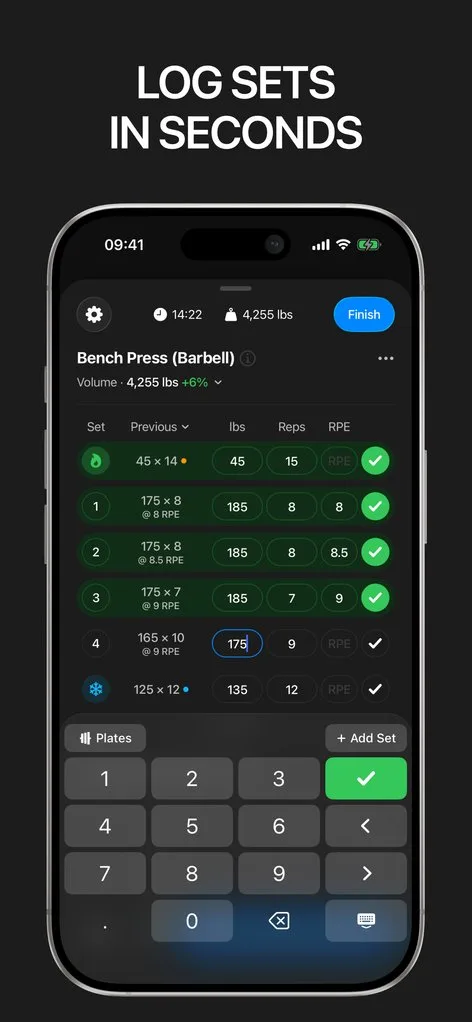
Gript is closer to Hevy in shape: a logger first, with a generator for days you walk in without a plan (three free, then Pro) and progression suggestions on any routine you own, not just ones the app wrote. It has the deepest charts of the three, no web app, and no social feed.
 How Hevy stands out
If you want to run your own program for free, with a community around it, Hevy provides:
- Unlimited free logging. Four routines, 7 custom exercises, three months of charts, the plate calculator, and a monthly report without paying. Fitbod has no free tier at all.
- A program library and a feed. 26 programs by level and equipment, community routines, likes, comments, and gym leaderboards. Fitbod has none of this.
- Every platform. iPhone, Android, iPad, Apple Watch with live sync, Wear OS, widgets, and a web logger at hevy.com.
- The lowest price. Pro is $2.99 a month, $23.99 a year, or $74.99 for life. No free trial of Pro, and CSV export needs Pro.
 How Fitbod stands out
If you want to open the app and be told what to do, Fitbod provides:
- A session written for you. Built from your equipment, goal, experience, and session length, tuned since 2015 across what Fitbod says is 150 million logged workouts.
- A per-muscle recovery model. The Body tab scores each muscle group from 0 to 100 percent recovered and the next session steers away from fatigued ones. Apple Health, Health Connect, Fitbit, and Strava feed it.
- A recommended weight on every set. Loads come from your estimated strength and move as you rate exertion or log Reps in Reserve. Custom exercises are ignored by the algorithm.
- 1,000+ exercises with video. Multi-angle video and written cues, against Hevy’s 400+ with animations.
- No free tier. A 7-day trial that requires choosing a plan up front, then $15.99 a month or $95.99 a year. Legacy $12.99 and $79.99 plans still appear in the App Store listing.
 How Gript stands out
If you have your own program and want help progressing it, Gript provides:
- Progression suggestions on any routine. The next weight or rep target and the reason (Pro), on routines you built yourself. Hevy’s lives inside Trainer programs, Fitbod’s inside generated sessions. See progression suggestions.
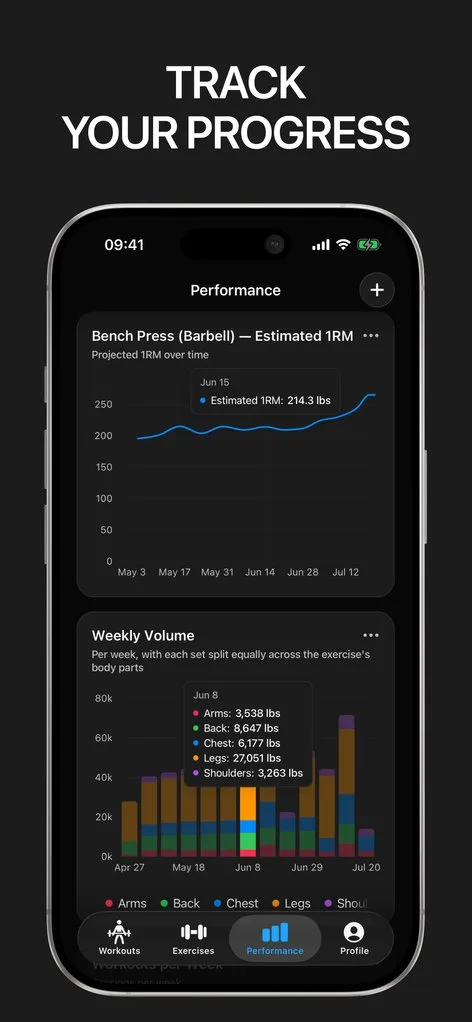
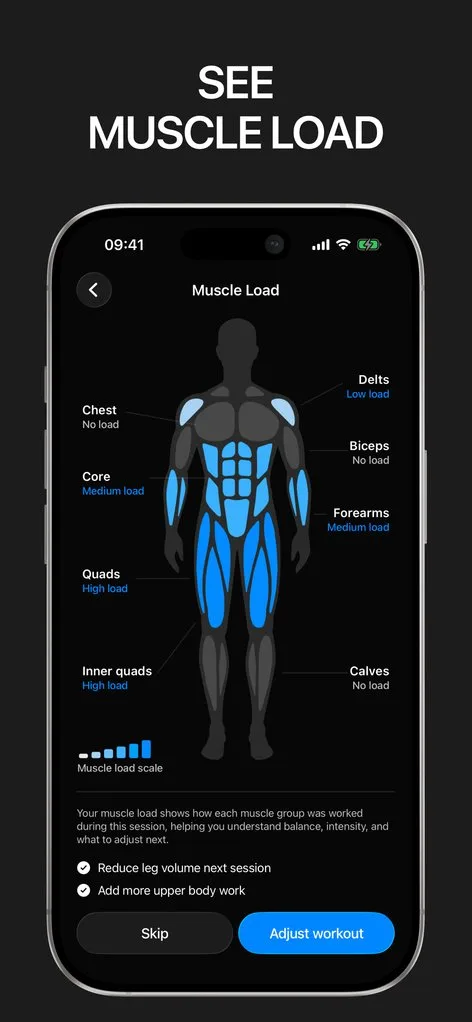
- The deepest charts of the three. Nine chart types per exercise, plus a training load heatmap, muscle balance radar, and body map. Twelve weeks free; longer ranges are Pro. See chart types.
- Import from 22 apps, export for free. Fitbod’s CSV imports directly, keeping warm-up sets, timed sets, and notes; so does Hevy’s. See import from Fitbod and from Hevy.
- A lighter generator. Equipment, time, and target muscles, but no recovery model. If you want every session planned, pick Fitbod or read Fitbod vs Gravl.
- iPhone, iPad, Apple Watch, and Android. No Wear OS, web, widgets, social feed, or monthly report, and 6 programs against Hevy’s 26.
Common questions
Is Fitbod worth it?
Yes, if you want the app to write every session and train three or more times a week: the recovery-aware generator and 1,000+ exercise videos are the best here, and $95.99 a year is about $8 a month. If you follow a program from a coach or spreadsheet, you would be paying for a generator you do not use.
Can I log my own workouts in Fitbod?
Yes, awkwardly. Tap Swap on the Workout tab, choose Create Workout From Scratch, add exercises, and save the workout to reuse it. The algorithm ignores custom exercises, rest timer edits do not persist, and there is no multi-week program structure. Hevy and Gript are built for this.
Can I import my Fitbod history into another app?
Yes. In Fitbod, open the Log tab, tap the gear icon, and choose Export Workout Data to get a CSV. Gript reads that file directly and keeps warm-up sets, timed sets, and notes; see import from Fitbod. Hevy imports Strong-format CSVs only.
Final verdict: which one should you choose?
- Choose Hevy ifHevy
you have a program or want to build one, want an app that stays useful for free, care about a feed, or log from the web or a Wear OS watch.
- Choose Fitbod ifFitbod
you want to open the app and be told what to do, train with variable equipment or travel a lot, and will use it often enough to justify $95.99 a year.
- Choose Gript ifGript
you have your own program and want a suggested next weight with a reason and deeper charts on top of Hevy-style logging.
Hevy is the safest default: free logging that stays free, on every platform. Fitbod is the one to pay for if you want the plan written for you. Gript is for the lifter with a program who wants suggestions and charts on it. Your history can move in a few minutes; see switch from Hevy.
Download Gript free and bring your history with you. If it does not earn its place, your data exports in one tap.
I have tried pretty much every workout tracker out there — Hevy, Strong and many others — and Gript has quickly become my favorite. The UI and overall design are easily the best on the market.
You're already in Gript
Everything on this page is also available inside the app — this article opens from Help, and the calculators live under Tools.
Side by side
| Feature | Hevy | Fitbod | Gript |
|---|---|---|---|
| Progress and charts | |||
| Per-exercise charts | Volume, best weight, reps, 1RM | Up to 7 metrics | 9 chart types |
| Chart history on the free tier | 3 months | None (subscription only) | 12 weeks |
| Muscle balance / body map | Yes | Yes | Yes |
| Body measurements | Yes | Yes | Yes |
| Personal records | Yes | Records | Yes |
| Your data | |||
| Import from other apps | Strong CSV | No | 22 apps |
| CSV export | Yes | Yes | Yes |
| Health sync | Apple Health, Health Connect, Strava | Apple Health, Strava, Fitbit | Apple Health, Health Connect |
| Logging | |||
| Unlimited free logging | Yes | No | Yes |
| Set types | Warm-up, drop, failure | Warm-up | Warm-up, drop, failure, cool-down |
| RPE / RIR | RPE | RIR | RPE and RIR |
| Rest timer | Yes | Yes | Yes |
| Lock screen Live Activity | Yes | Yes | Yes |
| Previous sets inline | Yes | Yes | Yes |
| Plate calculator | Yes | Not verified | Yes |
| Home screen widgets | Yes | Yes | Coming soon |
| Programs and coaching | |||
| Routines on the free tier | 4 | None (trial only) | 3 |
| Program library | 26 programs | None | 6 programs, 24 routines |
| Progression suggestions | Yes | Yes | Yes |
| Workout generator | Yes | Yes | Yes |
| Human coaching | No | No | No |
| Exercise library | 400+ | 1,000+ | 601 |
| Custom exercises | 7 free | Yes | 10 free |
| Social | |||
| Feed, friends, leaderboards | Yes | No | No |
| Platforms | |||
| Apple Watch | Yes | Yes | Yes |
| Android | Yes | Yes | Yes |
| iPad | Yes | No | Yes |
| Web app | Yes | No | No |
| Price | |||
| Monthly | $2.99 | $15.99 | $4.99 |
| Yearly | $23.99 | $95.99 | $29.99 |
| Lifetime | $74.99 | No | No |
| Free trial | No | Yes | Yes |
Facts checked September 17, 2026. US App Store prices; other countries differ. Something wrong? Let us know.