
Lyfta vs Hevy vs Gript: Which Free Workout Tracker Is Better?
Two free-first loggers with video libraries and social layers against a charts-first one: what Lyfta and Hevy give away, what Premium and Pro cost, and which app imports your history.
Updated September 27, 2026 · Facts checked September 27, 2026


Comparing Lyfta vs Hevy vs Gript
Lyfta comes from Lindberg Development AS in Norway and has been on the App Store since October 2022. It is free-first: tracking, a library of more than 5,000 exercise videos, saved plans, and RPE cost nothing, and Premium adds analysis and programs. Hevy is the biggest pure workout logger, also free-first, social, and on every platform. Gript is the third column because it is ours and because it goes the other way: fewer platforms and no feed, but the deepest free charts and the only import path for a Lyfta CSV. Facts come from each app’s own listing and help pages, checked 27 September 2026.
What sets Lyfta vs Hevy vs Gript apart
Lyfta is for people who want to watch the movement before they lift it and want friends in the app. Every exercise has HD video, there are streaks, challenges, leaderboards, and live PR notifications, and it runs on iPhone, Android, Apple Watch, Wear OS, and the web at my.lyfta.app. Lyfta says it has more than 8 million users, most on Android. Premium gates custom exercises, body measurements, the plate calculator, all-time charts, and unlimited routines, and there is no native iPad app.
Hevy is for anyone who wants unlimited free logging and the biggest community: a feed, gym leaderboards, and 26 built-in programs, on iPhone, iPad, Apple Watch, Android, Wear OS, and the web. Free accounts get 4 routines, 7 custom exercises, and 3 months of charts. Pro is the cheapest here, and its one import path is a Strong CSV.
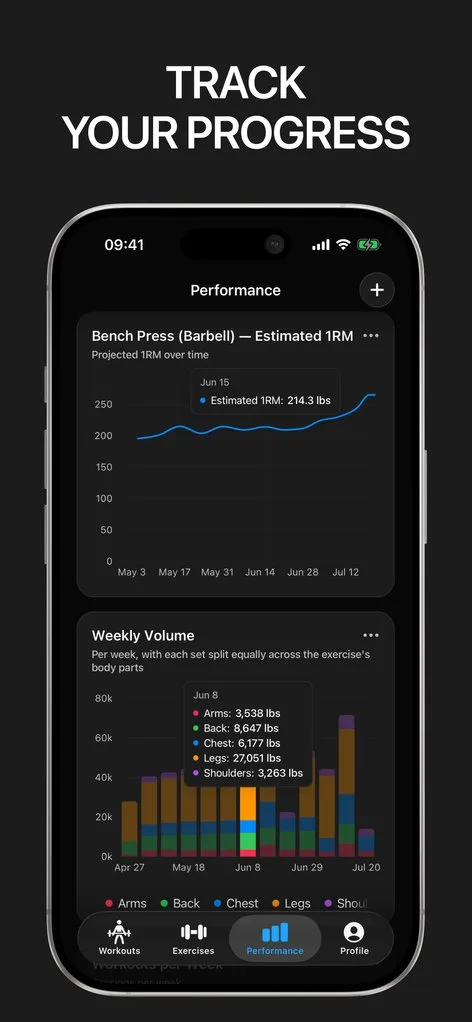
Gript treats the log as the product and the charts as the point: 9 per-exercise chart types, 10 training-wide charts, body measurements free, and progression suggestions on any routine. It has Watch and iPad apps but no web app, social layer, or Wear OS, and 6 programs to Hevy’s 26. It is the only one of the three that reads the Lyfta CSV.
 How Lyfta stands out
If you want video for every exercise and friends in the app without paying, Lyfta provides:
- A 5,000-video exercise library. HD video for every exercise, free. Hevy lists 400+ exercises and Gript 601, so on breadth Lyfta is far ahead.
- Web, Wear OS, and Shortcuts. my.lyfta.app handles settings, import, and export; the Wear OS app has Tiles; iPhone gets widgets and Shortcuts. The Watch app is a companion for watchOS 10.6 or later. No native iPad app.
- Imports from four apps. Strong, Hevy, FitNotes, and JEFIT exports come in, JEFIT through the web import tool, and Apple Health, Health Connect, and Strava sync. Hevy imports Strong only.
- Premium gates the small stuff. Custom exercises, body measurements, the plate calculator, auto warm-up, all-time charts, recaps, strength rankings, and unlimited routines need Premium. Tiers run from $5.99 to $79.99 with monthly, yearly, and lifetime options that vary by region, after a 14-day trial.
 How Hevy stands out
If you want to log for free and see what friends are lifting, Hevy provides:
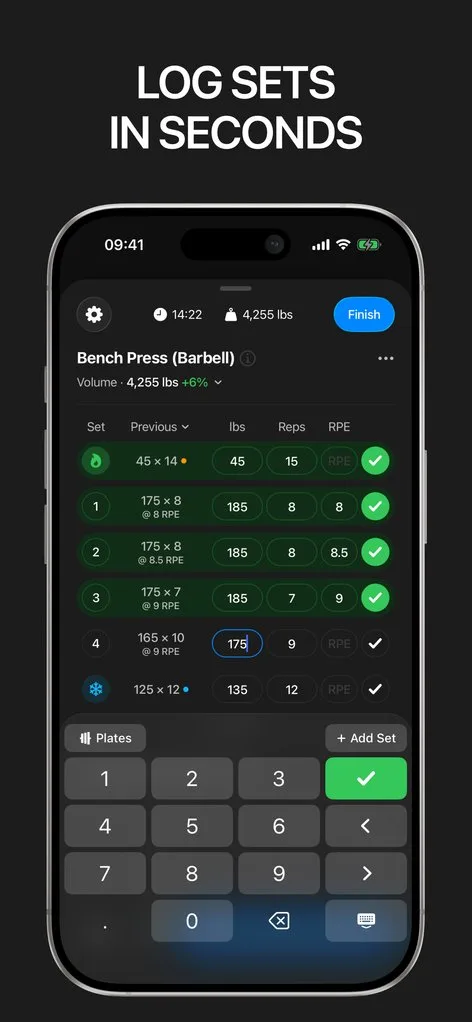
- Unlimited free logging. Warm-up, drop, and failure sets, RPE, supersets, a Live Activity rest timer, widgets, and a plate calculator that Lyfta and Gript both charge for. Free accounts get 4 routines and 7 custom exercises.
- The biggest community. A feed with likes and comments, gym leaderboards, shared routines, and about 95,000 US App Store ratings at 4.9 to Lyfta’s 6,700 at 4.8.
- 26 built-in programs. Hevy Trainer (Pro) adjusts working weights inside those programs; on your own routine you read the previous column and decide.
- Every platform at the lowest price. iPhone, iPad, Apple Watch, Android, Wear OS, and hevy.com. $2.99 a month, $23.99 a year, or $74.99 for life, no trial. Three months of charts free; weight and waist are the only free measurements.
 How Gript stands out
If you want the charts first and your Lyfta history with you, Gript provides:
- 19 chart templates. Nine per exercise, including working weight range and a weight-versus-reps scatter, plus 10 training-wide charts such as the body map and balance radar. 12 weeks free; longer ranges are Pro. See chart types.
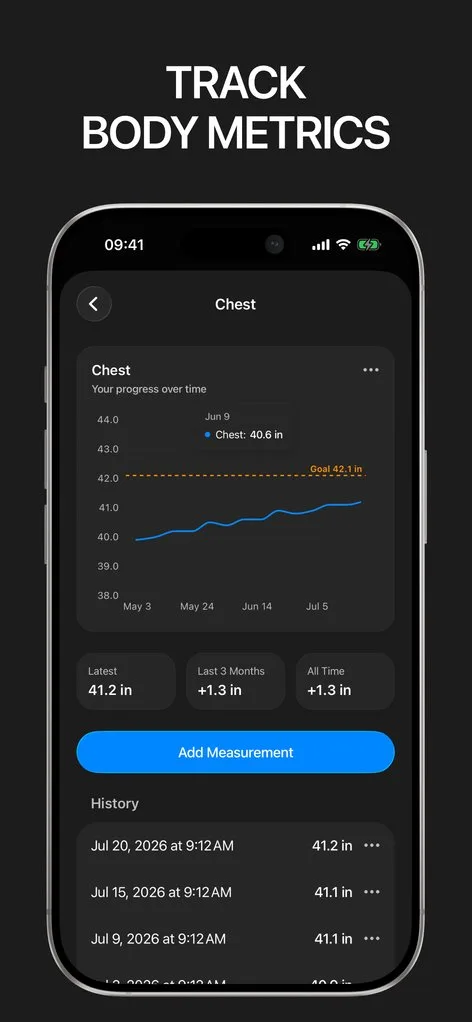
- Body measurements free. Every body part, with goals and left and right comparison. Lyfta puts measurements behind Premium; Hevy frees only weight and waist.
- Progression on any routine. RPE-aware suggestions with the reason shown, on routines you built; the first 5 are free, then Pro. See progression suggestions.
- Reads the Lyfta CSV. Set types and supersets come across intact, one of 19 apps Gript imports from. Export is free in Gript, Strong, and Hevy formats. See import from Lyfta.
- No web, social, Wear OS, or lifetime. iPhone, iPad, Apple Watch, and Android. 3 free routines, 6 programs, and Pro at $4.99 a month or $29.99 a year with a free trial.
Common questions
Is Lyfta free?
Yes. Tracking, the 5,000-video exercise library, saved and created plans, and RPE are free. Premium adds premium programs, recaps, all-time charts, strength rankings, a plate calculator, auto warm-up, custom exercises, body measurements, and unlimited routines; the free routine cap is not published.
How much is Lyfta Premium?
It depends on your region. Lyfta lists tiers from $5.99 to $79.99 across monthly, yearly, and lifetime options, so check the subscription page in the app; there is a 14-day trial. Hevy Pro is $2.99 a month or $74.99 for life with no trial; Gript Pro is $4.99 a month or $29.99 a year with a trial and no lifetime plan.
Can I import Lyfta into Hevy or Gript?
Not into Hevy, which imports a Strong CSV only. Gript reads the Lyfta export directly, set types and supersets included; see import from Lyfta.
Final verdict: which one should you choose?
- Choose Lyfta ifLyfta
you want video for every exercise, a web app, Wear OS, social challenges, and a lifetime price where it is offered, and can live with Premium gating measurements and custom exercises.
- Choose Hevy ifHevy
you want the largest community, the deepest program library, an iPad app, and the cheapest Pro, including a lifetime plan.
- Choose Gript ifGript
you want the widest free charts, body measurements without paying, suggestions on your own routine, and your Lyfta history imported.
Lyfta and Hevy are close cousins: free-first, social, and on every platform, and both the better choice if the feed or the video library is why you open the app. Gript trades that for charts, free measurements, and import. Leaving Hevy? The switch guide covers what carries over.
Download Gript free and bring your history with you. If it does not earn its place, your data exports in one tap.
I have tried pretty much every workout tracker out there — Hevy, Strong and many others — and Gript has quickly become my favorite. The UI and overall design are easily the best on the market.
You're already in Gript
Everything on this page is also available inside the app — this article opens from Help, and the calculators live under Tools.
Side by side
| Feature | Lyfta | Hevy | Gript |
|---|---|---|---|
| Progress and charts | |||
| Per-exercise charts | Per-exercise charts | Volume, best weight, reps, 1RM | 9 chart types |
| Chart history on the free tier | Limited | 3 months | 12 weeks |
| Muscle balance / body map | Yes | Yes | Yes |
| Body measurements | Yes | Yes | Yes |
| Personal records | Yes | Yes | Yes |
| Your data | |||
| Import from other apps | Strong, Hevy, FitNotes, JEFIT | Strong CSV | 19 apps |
| CSV export | Yes | Yes | Yes |
| Health sync | Apple Health, Health Connect, Strava | Apple Health, Health Connect, Strava | Apple Health, Health Connect |
| Logging | |||
| Unlimited free logging | Yes | Yes | Yes |
| Set types | Warm-up, drop, failure | Warm-up, drop, failure | Warm-up, drop, failure, cool-down |
| RPE / RIR | RPE | RPE | RPE and RIR |
| Rest timer | Yes | Yes | Yes |
| Lock screen Live Activity | Not verified | Yes | Yes |
| Previous sets inline | Yes | Yes | Yes |
| Plate calculator | Yes | Yes | Yes |
| Home screen widgets | Yes | Yes | Coming soon |
| Programs and coaching | |||
| Routines on the free tier | Capped | 4 | 3 |
| Program library | Community and premium programs | 26 programs | 6 programs, 24 routines |
| Progression suggestions | No | Yes | Yes |
| Workout generator | No | Yes | Yes |
| Human coaching | No | No | No |
| Exercise library | 5,000+ | 400+ | 601 |
| Custom exercises | Yes | 7 free | 10 free |
| Social | |||
| Feed, friends, leaderboards | Yes | Yes | No |
| Platforms | |||
| Apple Watch | Yes | Yes | Yes |
| Android | Yes | Yes | Yes |
| iPad | No | Yes | Yes |
| Web app | Yes | Yes | No |
| Price | |||
| Monthly | From $5.99 | $2.99 | $4.99 |
| Yearly | Varies | $23.99 | $29.99 |
| Lifetime | Yes | $74.99 | No |
| Free trial | Yes | No | Yes |
Facts checked September 27, 2026. US App Store prices; other countries differ. Something wrong? Let us know.