

Any file that holds workouts can be sent to Gript straight from the app it lives in. Share a CSV export, a PDF plan, or a screenshot of your notes, pick Gript in the share sheet, and the import starts with a preview before anything is saved. From Gript 1.16 on iPhone, iPad, and Android.
What you can share#
- CSV, TSV, and text exports from Hevy, Strong, JEFIT, and the other apps Gript reads directly — these import exactly, row by row.
- PDFs — a plan from your coach, a printed program, an exported training log.
- Photos and screenshots — a screenshot of a notes app, a photo of a handwritten journal page, a picture of a whiteboard.
- JSON and XML exports from apps that use them.
Files that are not one of the known CSV formats go through AI import, which reads the content and extracts the workouts it finds. Files need to be under 10 MB.
Share a file to Gript#
- Open the file where it is — Files, Mail, Notes, Photos, a messaging app, or the export screen of another tracker.
- Tap Share.
- Pick Gript from the row of apps. On iPhone, if it is not there yet, scroll to the end, tap More, and turn Gript on so it stays in the row.
- Gript opens on the import. Match any exercise names it did not recognise, check the summary, and confirm.
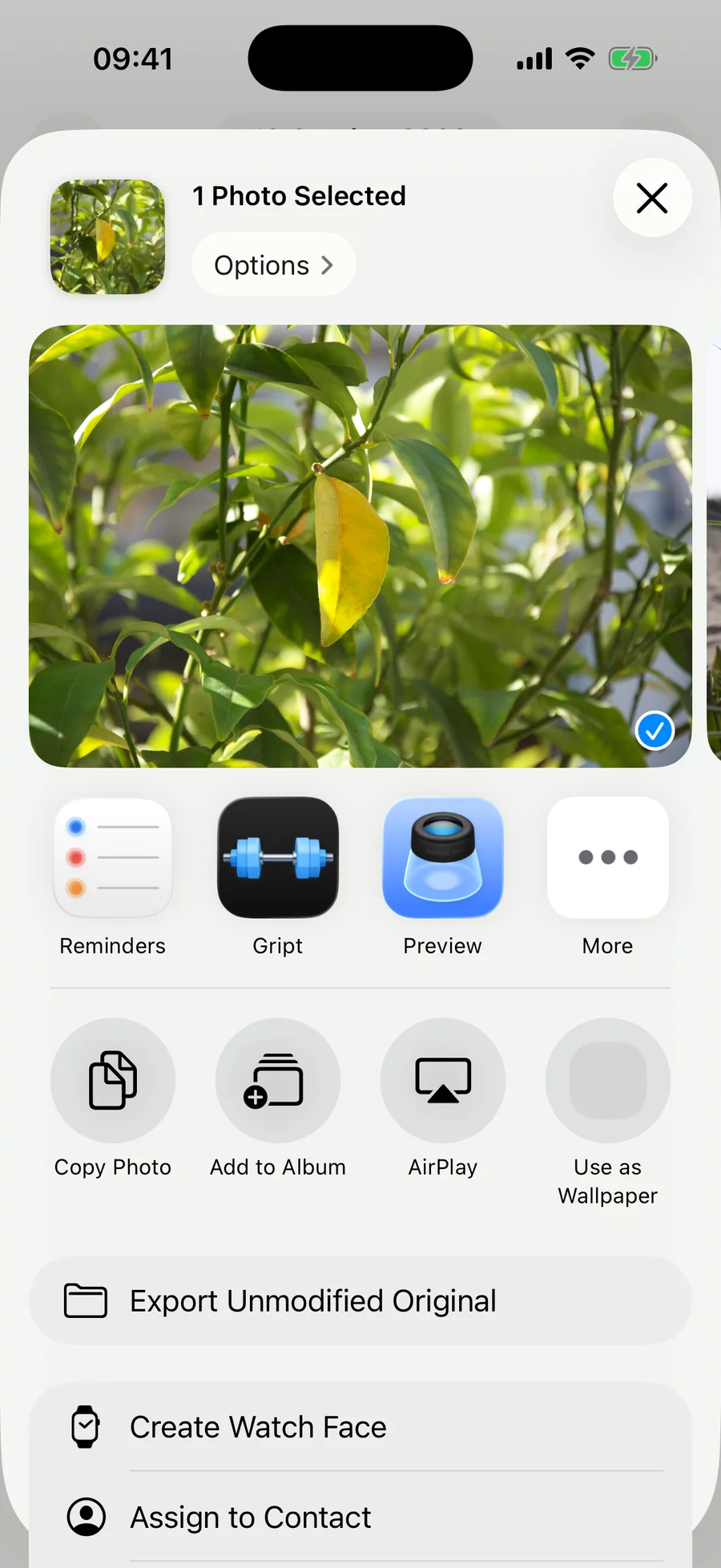
Because Gript registers as an app that opens these file types, it also appears when you tap Open in or Open with on a document, and on Android when you share to it from a file manager or your Downloads.
What happens next#
A shared file follows the same path as one picked from Profile → Import Workouts: exercise names are matched to the library on the Match Exercises screen, you see exactly what will be created, workouts already in your history are skipped, and nothing is saved until you confirm. If the source never says whether weights are kilograms or pounds, Gript asks before creating anything. The details are in how import matching and duplicates work.
If the file is a training plan rather than a log of sessions you already did, Gript offers to turn it into routines instead.
Shared while you were signed out or still in onboarding? Gript keeps the file and starts the import as soon as you are on the main screen. If another import is already running, the shared one waits its turn.